
One of my colleagues introduced me to the Microsoft Natural keyboard at my first job and I thought that was pretty decent… so for about 20 years, that’s what I used.
Over the last few years I’ve been working more with Macs, so I switched to a Logitech Ergo K860. It’s pretty similar from a design and ergonomics POV but it has a better layout when you need to switch between Windows and MacOS.
During the 2020 lock downs I had a crappy work from home setup and I started to get wrist pain since my desk was too low and my wrist was at a permanent angle… so I invested in a standing desk and a Logitech MX Vertical mouse - both good moves.
Since then, I’ve had a couple of minor accidents (one gardening, one wing foiling) and took up rock climbing again… which lead to the emergence of a chronic and worsening pain known as “golfer’s elbow”. Basically the tendon on the inside of the elbow (that all of the muscles controlling your hand and fingers attach to) is stuffed. I’m a computer programmer though, so I can’t just stop using that tendon.
While looking around for solutions, I found out about ergo mechanical keyboards and it just blew my mind 🤯.
I think one of the first “weird’ keyboards that I stumbled across was the Dygma Defy.
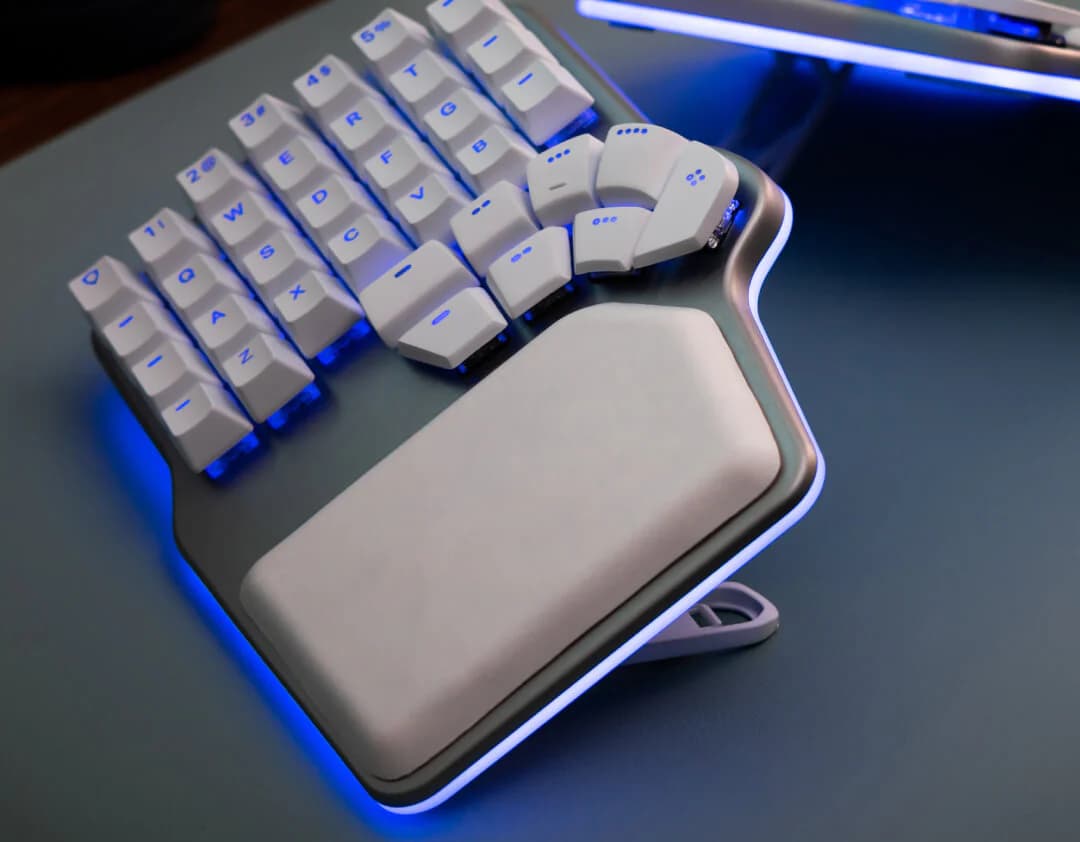
For someone who had no exposure to mechanical keyboards, it’s a crazy looking beast. It’s split into two halves, has a gazillion mysterious buttons where you’d usually find a space bar… some other mysterious buttons to the left of the numeric keys - flashing lights and it’s got some serious angle to it.
I was a little concerned about the price though, so I started doing a bit of research… and if you search for “keyboards like the Dygma Defy” on Google or Gemini, you quickly end up bumping into all kinds of other keyboards, each more weird and wonderful than the last.
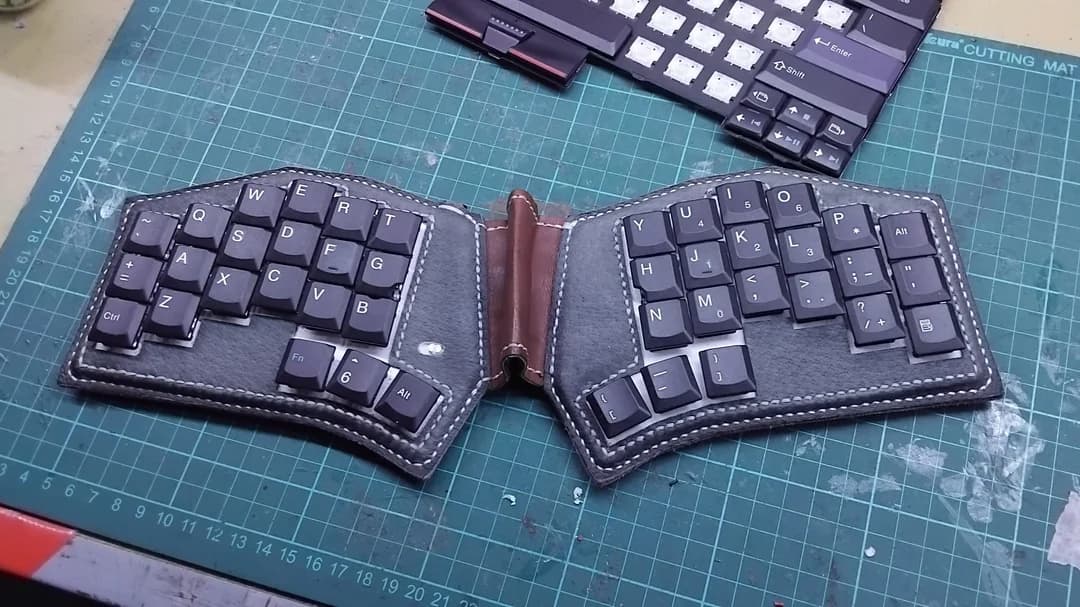
There’s this one, with a leather case:
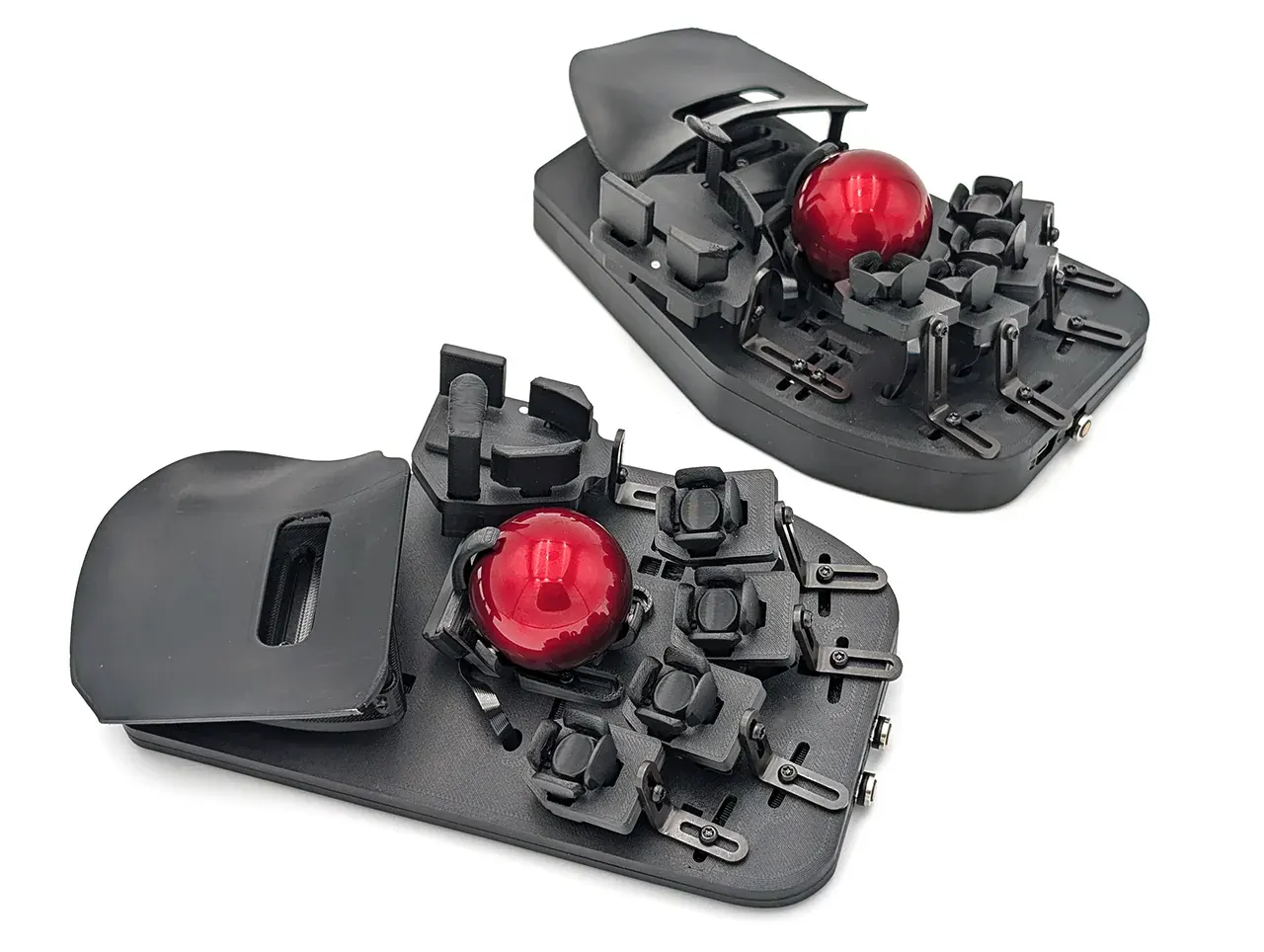
Or the svalboard that barely resembles a keyboard at all any more:
Shortly after that, I found out about r/ErgoMechKeyboards and discovered that there is an absolute crap load of people around the world spread across multiple distinct communities creating and sharing the designs for keyboards that are customisable, programmable and, very often, open source… so you can grab the designs for their keyboard from a github repository and build it yourself (just as you might do with a Linux distro).
Some of these people just like fiddling with electronics and 3D printers. Some of them are crazy gamers in the quest for that 10ms edge over their rivals. Some of them want to type over 200 words per minute. Yet others, like me, have been using computers way too long and have some aches and pains they are trying to address… and they’ve been working on this problem together since… well forever - so there is a lot of knowledge there.
So what is it about these keyboards and why are they so fucking awesome?
What’s wrong with my normal keyboard?
The classic keyboard shape most of us grew up with is known as a row-staggered keyboard with a QWERTY layout. This isn’t the result of a grand ergonomic plan. It’s a historical accident.
Early mechanical typewriters used physical levers (“typebars”) that had to swing up and strike the paper. So that the typebars didn’t crash into one another, the keys were arranged in offset rows.
QWERTY came out of the same era. It became the default for early typewriter manufacturers and for training/typing classes.
Modern keyboards don’t have typebars anymore and changing the keyboard layout is reletavely simple… but there’s no commercial reason to do this. Just try selling a keyboard that doesn’t have a QWERTY layout… it’s a good way to limit your potential customer base. So, year after year, Apple, Microsoft, Lenovo, HP… all trundle out the same row staggered QWERTY keyboards they always did… the same keyboards that make it harder for you to type!
1) The keys don’t line up with how fingers move
Your fingers mostly flex straight forward/back from the knuckle. Row stagger forces you into sideways reaches and diagonal movement, especially for:
T,Y,G,H,B,N(depending on hand size)- numbers and punctuation
- modifier keys (Shift/Ctrl/Alt/Cmd)
This encourages little twists and reaches that add up over long days.
2) The layout creates “long travel” for common actions
QWERTY puts a bunch of very common things off the home row and often on weaker fingers. The result is:
- more finger movement than necessary
- more pinky work (Shift, Enter, Backspace, punctuation)
- more stretching for symbols and numbers (which matters a lot if you code)
3) The standard keyboard shape fights your arms and wrists
A one-piece keyboard assumes your hands should point inward toward each other. For many people that means:
- wrists angle outward (ulnar deviation)
- forearms are forced to rotate more than they’d like (pronation)
- shoulders tend to roll inward to reach the center
4) The thumb is underused and the pinky is overused
On a traditional layout, your strongest digit (thumb) mostly hits one huge key (space) while your weakest digit (pinky) gets stuck with a pile of high-frequency responsibilities (Shift, Enter, Backspace, modifiers).
5) It optimises for “familiar” not “fit”
None of this makes a normal keyboard “bad”. It just means the default keyboard is optimised for:
- mass manufacturing
- backwards compatibility
- what people already know
…not for reducing strain or adapting to different bodies, injuries, or workloads.
If you don’t have a problem with your current keyboard, it’s very unlikely you read this far and you probably won’t give a crap about mechanical keyboards. However, if you spend a lot of time on your keyboard and you’re starting to run into issues, ergo-mechanical keyboards let you completely reinvent your keyboard experience.
What’s so flash about mechanical keyboards?
Using mechanical keyboards you can customise both the hardware and the software.
Custom hardware
To start with, you don’t need to use a row staggered layout. You can do what’s called ortholinear (where the keys are in a grid, like on a numpad) or column staggered (where columns are offset vertically to reflect the fact that your fingers are not all the same length).
You can also customise the switches and keycaps.
Switches are the little mechanisms under each key that determine how a key feels and sounds when you press it. You can choose things like how much force it takes to press a key, how far it travels and how noisy it is.
Keycaps are the plastic caps you actually touch. They can be flat, curved, big, small, plastic, metal and any colour you can imagine…
For “normal” keyboards this stuff is mostly a fun aesthetic choice. For ergo boards, it can be part of making the keyboard fit your hands and reducing strain.
Custom software
The firmware that these keyboards use (QMK and ZMK) is also open source and lets you change the way the keyboard behaves.
A simple example is moving the keys around to use a better layout than QWERTY.
But you can also get keys to do different things. For example, you can have a key be a space bar when you press it but do something else (e.g. be a shift key) when you hold it down.
This firmware is the key to unlocking the more exotic ergo mechanical keyboards that have fewer keys than you find on a normal keyboard.
At present, I’m writing this blog post on a keyboard that only has 36 keys - which is my daily driver.
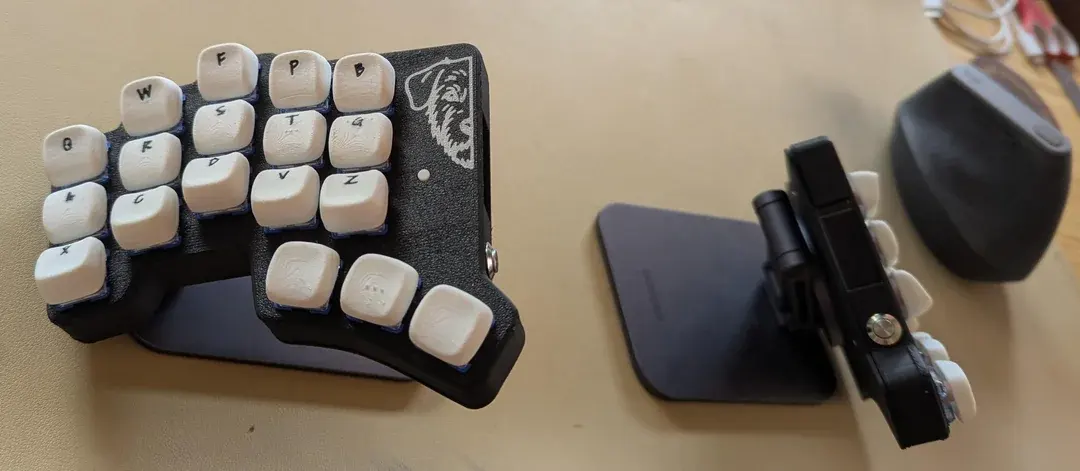
The keys themselves are arranged in a layout called Colemak DH, which is way better than QWERTY by pretty much any metric except popularity.
The bottom row on the left hand has the characters XCDVZ… those are the characters that the keyboard emits when pressing those keys. However, holding down the X key acts like a Shift modifier… so if I hold X and press l that types a capital L. Similarly I can hold down C, D and V to apply the Ctrl, Opt or Command modifiers. There are similar tricks used to replace the other keys so I don’t need dedicated number, function or arrow keys. Rather than moving my hands and fingers to find those things on the keyboard, I can make those things come to my fingers instead.
All of this means that I don’t have to stretch my fingers so far when typing, which reduces strain and effort and avoids chronic pain.
The keyboard halves are mounted magnetically to a couple of mag safe mobile phone stands that mean I can change how far apart they are (which I do regularly, to avoid being stuck in the same position for too long - my physio reckons that more important than a good posture is to regularly change your body position… we were meant to move, apparently) and I can also change the angle of the keyboards to match what’s comfortable for my wrists and elbows.
This is the first keyboard I ever made (and practically the first thing I ever soldered)… so it’d definitely not perfect but it has already made a massive difference. I’ve been typing on it now for 2 months and I’ll definitely build a second keyboard where I improve a bunch of things based on what I’ve learned so far… which will be the subject of a future post.
Before wrapping up this post however, I’ll leave you with one final anecdote touting the magical powers of mechanical keyboards. About a month ago, I started getting pain in my pinky (again - I’ve had it before on my Logitech keyboard as well). I quickly pushed a change to the git repo for my keyboard configuring a couple of key combinations so that I can use my index and middle fingers to type the ' and / keys (which would normally require the pinky on my right hand) and Voila - no more pinky pain!
Yet another job well done by Super Ergo Mechanical Keyboard 🦹🏻♂️⚙️⌨️!
OK, I’ll leave my religious evangelising at that for today. If you liked this sermon, I’ll be back with more prattling in a bit.