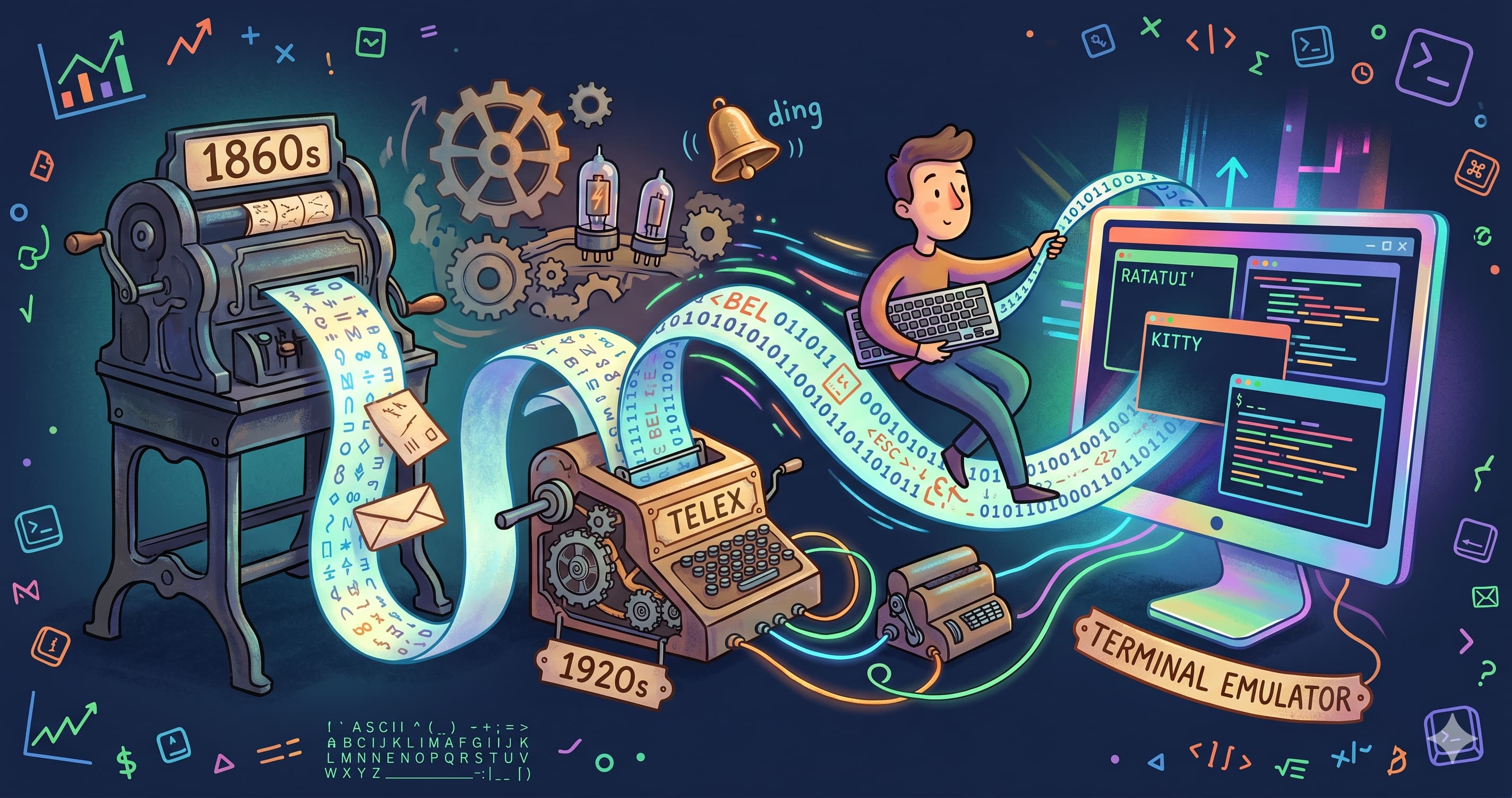
I’ve been spending a lot of time in the terminal lately. I really like that I can leave my hands on the keyboard and not constantly have to switch over to using the mouse. Terminal applications are super easy to build and maintain and people who use these applications quickly get very fast at navigating around them.
Obviously then, I started building a few of my own TUI applications. As an initial experiment, I figured I’d try to build a text editor for the terminal, inspired by VS Code. I was excited and work progressed quickly… then I started bumping into some really weird stuff.
Why does Ctrl + G beep? Why can’t my (very fancy programmable) keyboard send Shift + Enter cleanly to a terminal app? Why on earth would someone use hjkl instead of arrow keys? And what the heck does TTY even stand for?
It turns out there’s a 150-year story behind all of this. Once you’ve heard it, things are no less weird, but at least they make sense.
Table of contents
Open Table of contents
It started with crazy stock prices… 📈
In the late 1860s, stock prices moved fast, and the only way to get them out of the exchange was to send a runner, or have a skilled telegraph operator on each end translating Morse by hand. To solve this problem, folks like Edison came up with the stock ticker. This central transmitter on the exchange floor sent electrical pulses down a wire. Those pulses spun a little wheel inside a remote machine, and the wheel stamped letters and numbers straight onto a strip of paper. No operator needed at the other end - the machine itself did the decoding.
Essentially, they had a stream of text running down a single circuit, one character at a time, asynchronously. 🤔
By the 1920s, Teletype Corporation had turned this into a fully fledged global network called Telex - basically automated typewriters yelling at each other over telegraph lines. To keep bandwidth low they used Baudot code, which was 5 bits per character. 5 bits gives you 32 combinations, which is not enough for both letters and numbers, so the machines had a physical hardware hack called Figures Shift / Letters Shift that mechanically flipped the machine into “numbers and punctuation mode”.
ASCII and the birth of CTRL 🔡
Fast forward to the 1960s. Early computers were moving away from batch processing (where you handed a stack of punch cards to an operator and came back the next day). Researchers were inventing time-sharing, allowing multiple people to interact with a computer at the same time. But computers didn’t have monitors yet - monitors were still expensive, experimental radar tech. Teletypes, on the other hand, were already widely used.
One problem with Teletypes was that they still spoke the old 5-bit Baudot code used by the Telex telegram network but the computing and telecom industries desperately needed a standard, larger character set.
In 1963, two massive things happened simultaneously:
- The American Standards Association published ASCII.
- The Teletype Corporation commercially released the Teletype Model 33 as the flagship device for this new ASCII protocol.
ASCII bumped the wire signal up to 7 bits allowing for 128 combinations, divided into two parts.
- Slots 32–127 = printable characters (the stuff you actually see on the paper)
- Slots 0–31 = control characters
Control characters don’t get printed - instead they’re instructions to the machine itself - remember we’re talking about a protocol that is designed to remotely control a typewriter. Control characters do things like “ring the bell”, “feed the paper up a line”, “slam the carriage back to the left margin”. The 7-bit ASCII signal carries both your text and the commands to drive the printer hardware down the same wire.
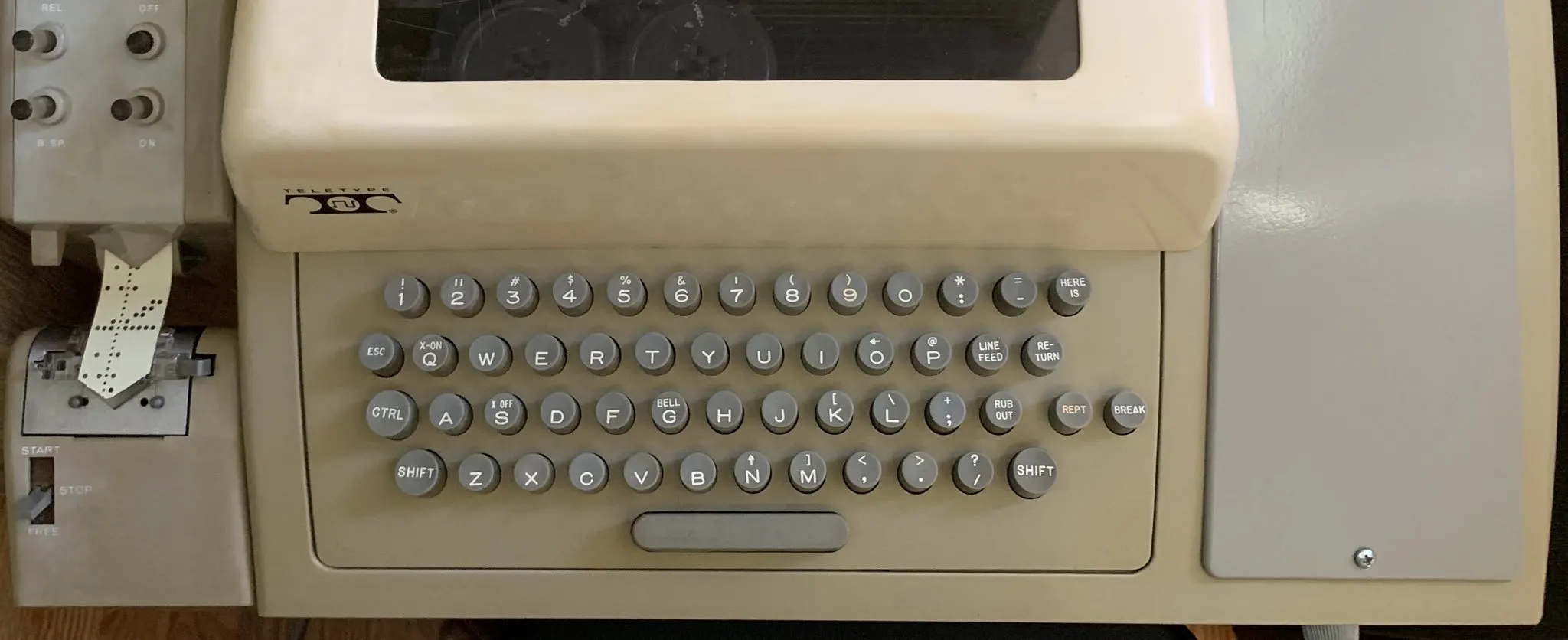
The Teletype Model 33 included a CTRL key for this purpose. Holding CTRL while pressing a letter would mask off the high bits of that letter’s ASCII code. Hit Ctrl + G and you’d strip the bits of G (decimal 71) down to decimal 7 - which is the BEL control character. Decimal 7 was wired up to a literal brass bell inside the machine. You pressed Ctrl + G and a physical bell went ding 🔔… weirdly enough, this still works inside the terminal on a MacBook Pro today (try typing CTRL + G in your terminal and enjoy the music)!
Many of the terminal keyboard shortcuts today stem from the design of the hugely influential model 33 (you can see the control characters printed above the letters on various keys):
| Shortcut | Originally |
|---|---|
Ctrl + S | Pause the paper feeder so it didn’t physically jam (X-OFF) |
Ctrl + Q | Resume the paper feeder (X-ON) |
Ctrl + C | Repurposed by OS designers as “emergency brake on the CPU” |
\n and \r | Advance the paper and slam the carriage back |
So the next time you press Ctrl + S and your terminal freezes, you can blame paper feed jams from the 60s (then press Ctrl + Q to resume).
Glass teletypes 📺
By the late 70s, CRT monitors were cheap enough to replace the paper roll. The DEC VT100 (1978) was the definitive “glass teletype” - same serial wire going in, but instead of hammering ink, a microprocessor painted pixels on a screen.
The VT100 wasn’t a typewriter and it needed to be able to do some things that typewriters didn’t. There was no room in the ASCII codes to add extra instructions. So instead they used the Escape byte (0x1B which you probably would have seen printed out as ^[ on your terminal at some point) to introduce ANSI Escape Sequences - strings like ^[[2J to clear the screen, or ^[[31m to switch to red text.
These VT100 escape sequences are still present in virtually every terminal emulator in use today. iTerm2, GNOME Terminal, Windows Terminal, Apple Terminal, Alacritty - they’re all emulating a piece of hardware from 1978… kinda like an electric car that will also run on coal for backward compatibility.
PTYs: lipstick on a teletype 💄
Once hardware terminals died off, operating systems invented PTYs (pseudo-teletypes) - a software shim whose entire job is to lie convincingly to old command-line software, making it believe it’s still talking to a mechanical typewriter over a serial wire… so that software will continue to run correctly.
Every time you open iTerm2 or Windows Terminal, a PTY spins up so that bash or zsh can happily keep speaking the 1960s teletype protocol. The terminal emulator parses the ASCII + VT100 stream on the other end and draws coloured rectangles on your fancy retina display.
This works! But it has consequences:
- Your terminal app can’t easily tell
Tabapart fromCtrl + I- they’re the same byte on the wire (decimal 9). Same story forEscapeandCtrl + [(decimal 27). Shift + Enter,Ctrl + ;, or any other “obvious” key combo that a GUI app handles fine are often impossible to send cleanly in a PTY- Modifier keys like
Cmd,WinandAltget squeezed through ancient 7-bit pipelines that were designed to talk to typewriters, and frequently come out mangled or never make it out at all.
The renaissance 😺
The good news is that people have finally started building stuff that breaks out of the 7-bit prison. In 2021 the terminal emulator Kitty introduced a progressive enhancement protocol. A modern TUI app sends a query at startup. If the terminal is modern enough, it responds and the two sides agree to drop the teletype caveman speech and use a richer encoding instead.
If your terminal supports the Kitty protocol and you’re using a modern terminal app that can take advantage of it, lots of the constraints of ASCII and VT100 drop away:
Tabis finally distinct fromCtrl + I.Escapeis distinct fromCtrl + [.Shift + Enter, complex multi-key chords, even key press, repeat and release events can all finally work inside a TUI
Modern terminals like iTerm2, Alacritty, WezTerm, foot, Ghostty have all picked up the protocol, so if you’re building TUIs then this is the way!
Wrapping up
So it turns out the reason terminals are weird isn’t because terminal emulator designers are weird (well… not only that 🤓). It’s because even modern terminals are still dragged down by 150 years of oddly annoying constraints.
Knowing this doesn’t fix any of it, but it does make it easier to come to terms with and stuff like Kitty’s keyboard protocol offers a bit of light at the end of the tunnel.
With luck, one day, we’ll eventually be able to stop using our computers as though we’re still typing on 1920s typewriters.
If you want to be part of the cleanup: build your next dev tool as a TUI targeting the Kitty protocol, and use a terminal emulator that supports it.
The glass teletype is dead! Long live the glass teletype 🪦.